2026
20.01.2026
Now mandatory: multi-factor authentication for XENTRY applications
19.01.2026
Improvements in January 2026
2025
03.11.2025
Improvements in November 2025
21.10.2025
How to easily find and purchase repair and maintenance information (Videos)
07.10.2025
Shared insight, joint solution: support ticket sharing with your Mercedes-Benz partner
08.09.2025
B2B Connect – Release Letter September 2025
27.08.2025
In the video: Improvements at a glance
25.08.2025
Update of Mercedes-Benz B2B Connect Terms of Use
01.07.2025
Upcoming Update on Reman Content on B2B Connect
27.06.2025
Shared insight, joint solution: support ticket sharing with your Mercedes-Benz partner
16.06.2025
In the video: Improvements at a glance
16.06.2025
Mercedes-Benz B2B Connect – Release Letter June 2025
14.05.2025
Help us make XENTRY SUPPORT SYSTEM even better – we need your input!
24.04.2025
Mercedes-Benz B2B Connect – Release Letter April 2025
19.03.2025
Reminder: End of support and lease termination XENTRY Diagnosis Kit 3
11.03.2025
Reminder End of Support and Deactivation of All Retail Data Storage 4 Terabyte (TB) Systems
19.02.2025
Mercedes-Benz B2B Connect – Release Letter February 2025
20.01.2025
End of support and contract termination of all XENTRY Diagnosis Kit 3 systems
13.01.2025
The XENTRY Combo Package: Have you already checked it out?
2024
04.12.2024
End of support and deactivation of all Retail Data Storage 4 terabyte (TB) systems
28.11.2024
Mercedes-Benz B2B Connect – Release Letter December 2024
05.11.2024
Support News & Updates
07.10.2024
Mercedes-Benz B2B Connect – Release Letter September 2024
29.07.2024
Mercedes-Benz B2B Connect – System Update – July 2024
12.06.2024
Important information for the Retail Data Storage 4 Terabyte
03.06.2024
B2B Connect – Release Letter May 2024
25.03.2024
B2B Connect – Release Letter March 2024
04.03.2024
New: USB to LAN adapter for faster data transfer during control unit programming
10.01.2024
B2B Connect – Release Letter January 2024
2023
11.12.2023
Price reduction Starter
13.10.2023
Ahead of competitors: our Genuine Parts
01.08.2023
B2B Connect – Release Letter August
04.07.2023
B2B Connect – Release Letter July
28.06.2023
From July 4: even more features
25.05.2023
XENTRY Diagnosis – Important information regarding XENTRY Diagnosis Hardware and/or Software with “Mixed” data scope
16.05.2023
B2B Connect – Key Updates April
16.05.2023
B2B Connect – Key Updates April
25.04.2023
Now online: your portal update for most efficient work processes
2022
28.11.2022
Introducing Damage Code as a new powerful module
28.08.2022
New: XENTRY Diagnosis Lite – available from 05.09.2022!
27.06.2022
New functions in XENTRY WIS
11.05.2022
As of quarter 4/2022 additional authentication for XENTRY Flash operations
11.04.2022
XENTRY WIS and XENTRY Operation Time now available for independent workshops
2021
21.11.2021
New feature DWD (Dynamic Wiring Diagram)
Support News & Updates
Accessing support has never been easier as we have made our help page clearer so that you can find answers to your questions easily in the future.
Our new support system also offers you faster communication channels and interaction options with our experienced support team.
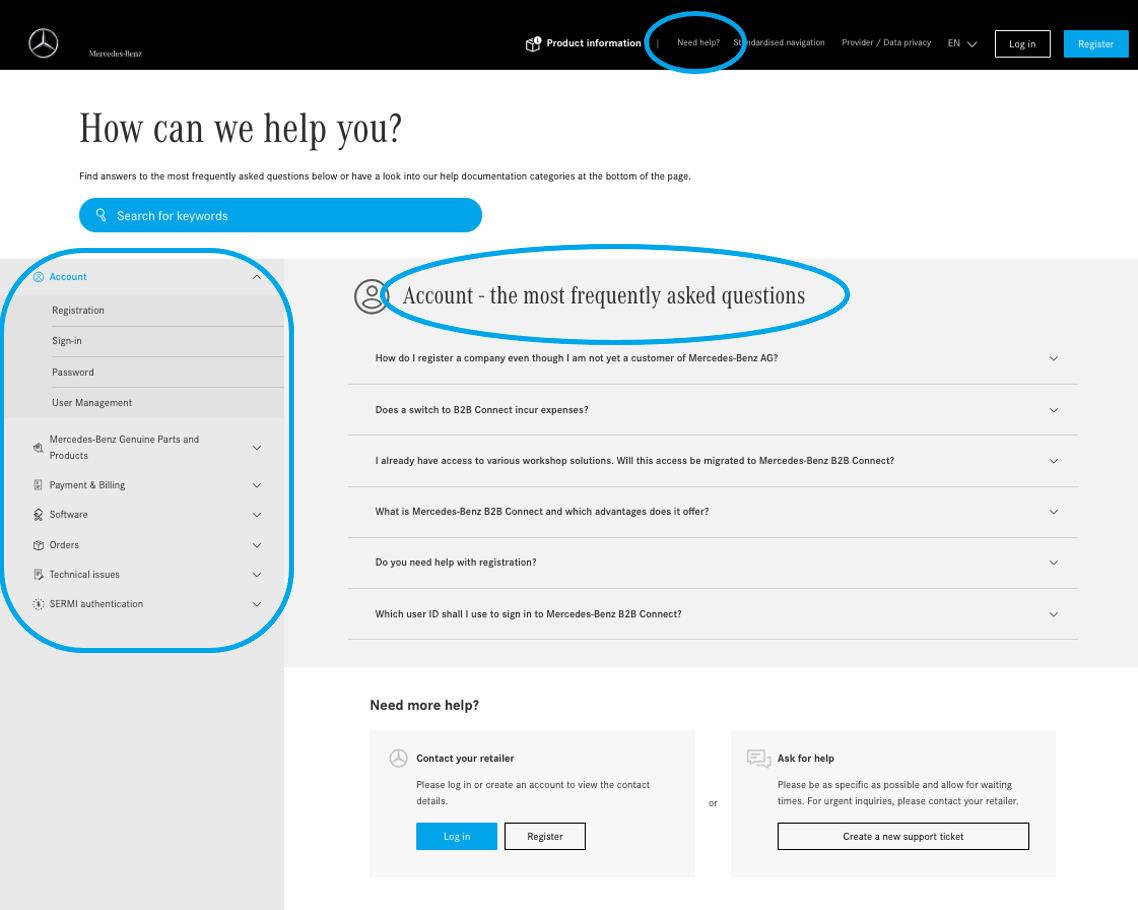
Support “Need help?"
The most frequently asked questions of each category are listed by default.
All questions about the individual products can now be found in the navigation menu. Click on a product and a list of subcategories will be displayed.
All available questions are listed on the right.
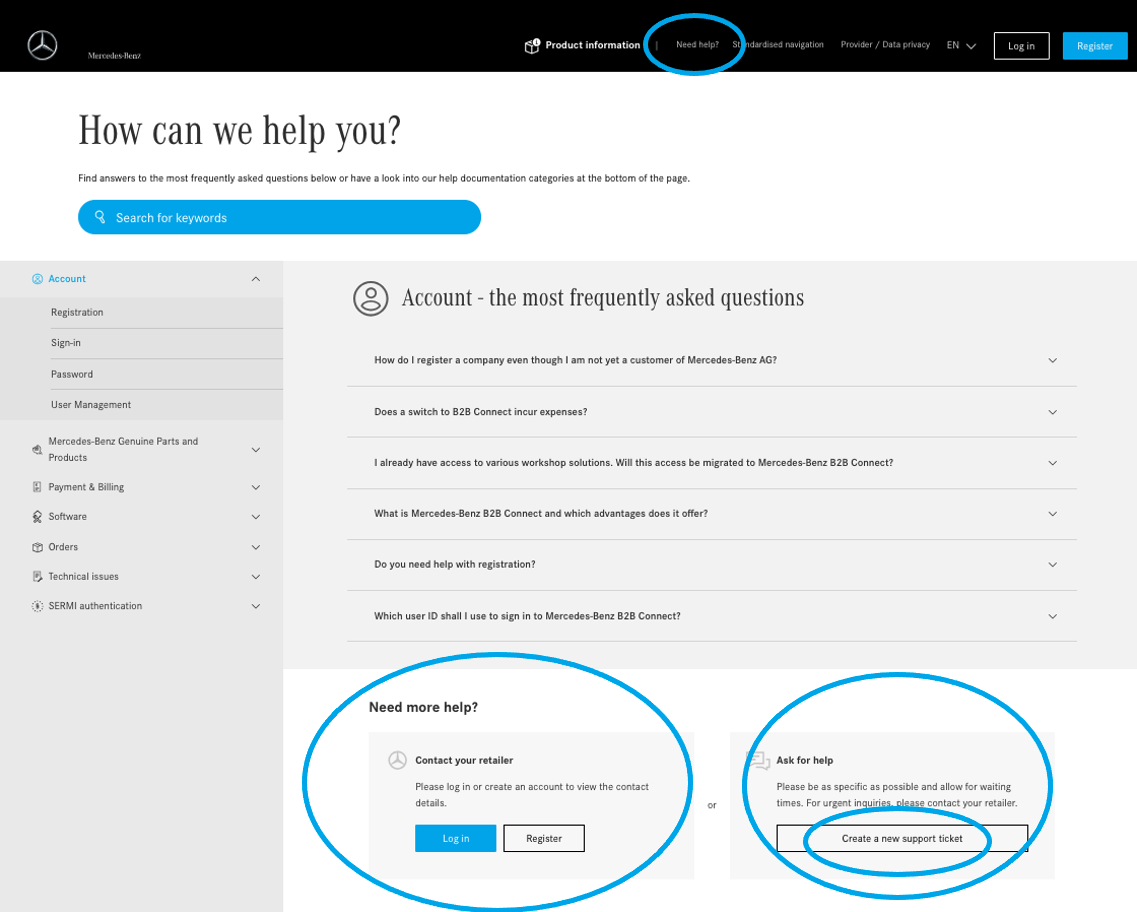
Support “Need more help?"
If the topic you need support with is not listed, there is also the option to raise a support ticket specific to your query.
To do so, click on “Create a new support ticket".
Raising Support Tickets
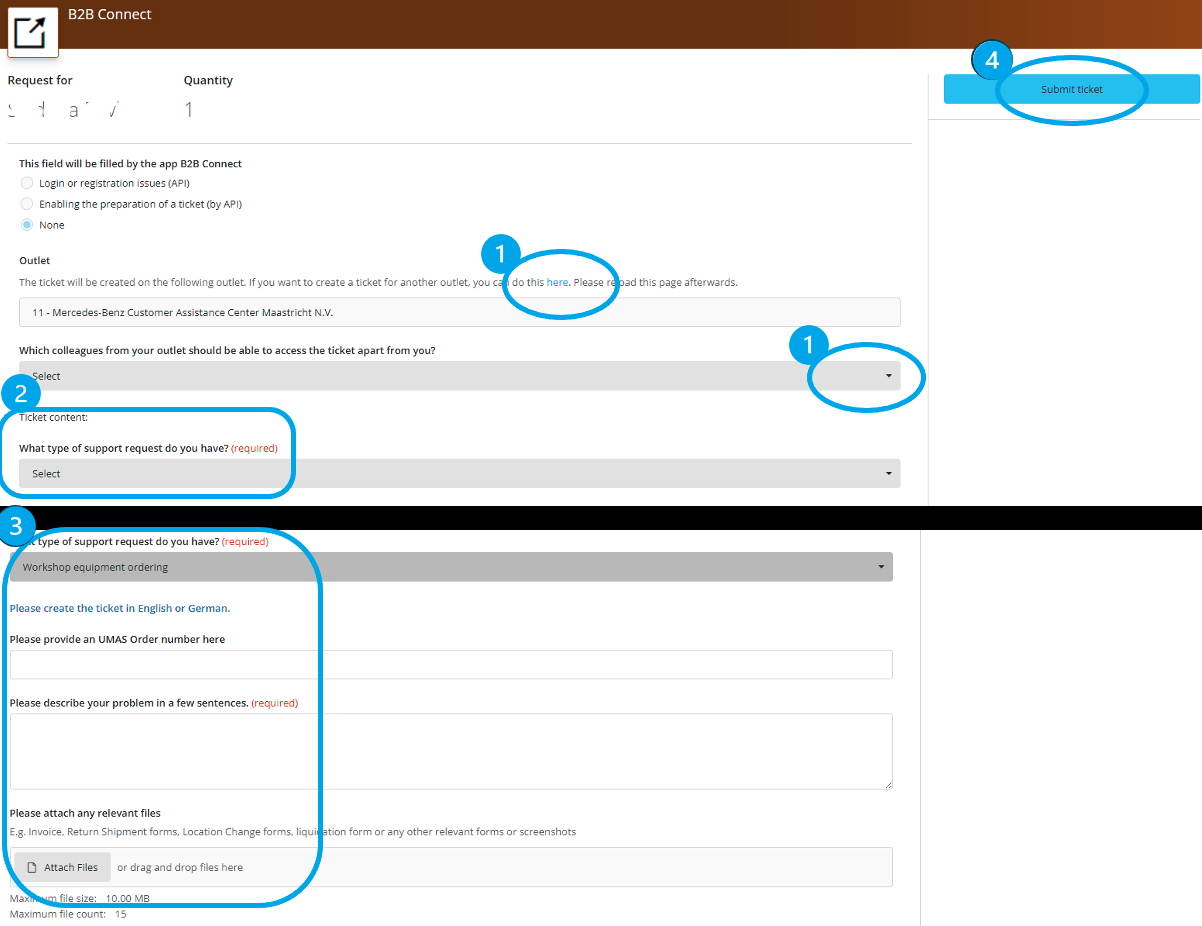
Xentry Support System (XSS) will be opened once you have requested to raise a support ticket.
1. Optionally and only if applicable, you can change your dealership here and grant colleagues access to your request.
2. Now select the topic for your request.
3. Depending on the topic, further information is requested. Please fill it out accordingly.
4. Now click on "Submit ticket".
Support
Track support ticket
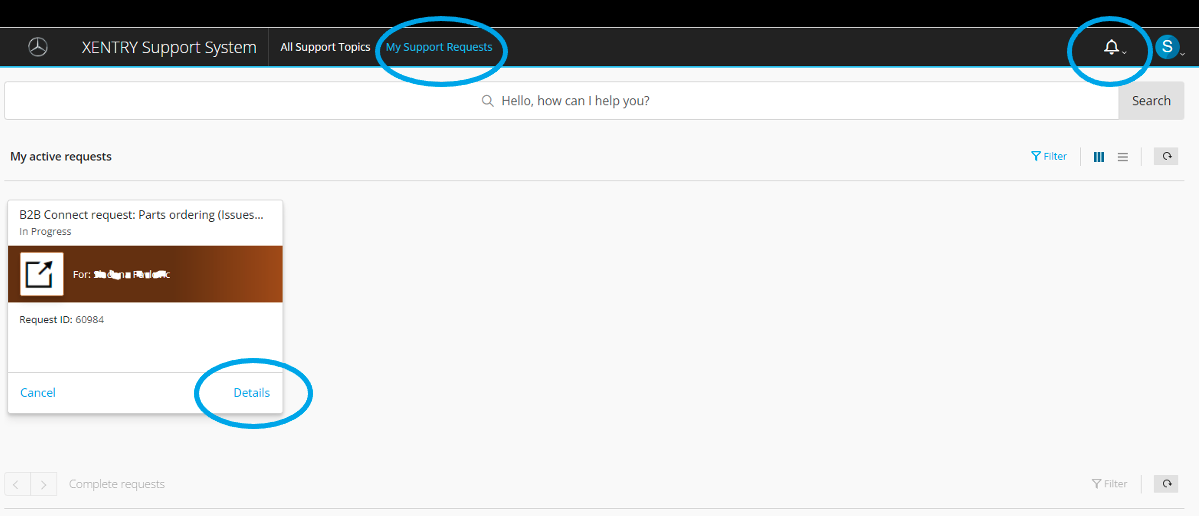
Your request now appears on the main page of the Xentry Support System (XSS) under "My Support Requests". Click on "Details" to open the request.
At the same time, you will receive an automatic confirmation e-mail with a link to XSS and your request.
For each new messages from our support, you will receive another e-mail with the link. In XSS, the number of new messages appears next to the bell symbol.
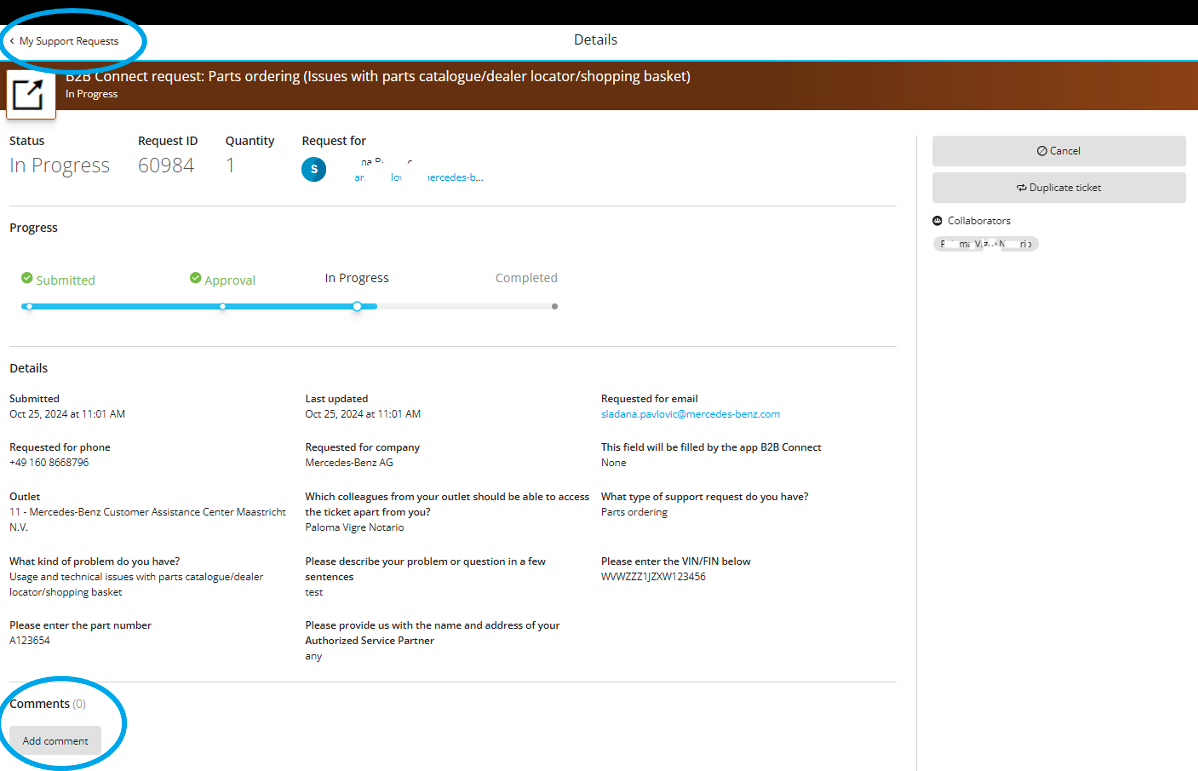
When you open a request, you will see an overview with the status of your request and all details.
Under "Comments" you communicate with our support team and read the messages, queries or solutions to you.
Click on "Add comment" to reply.
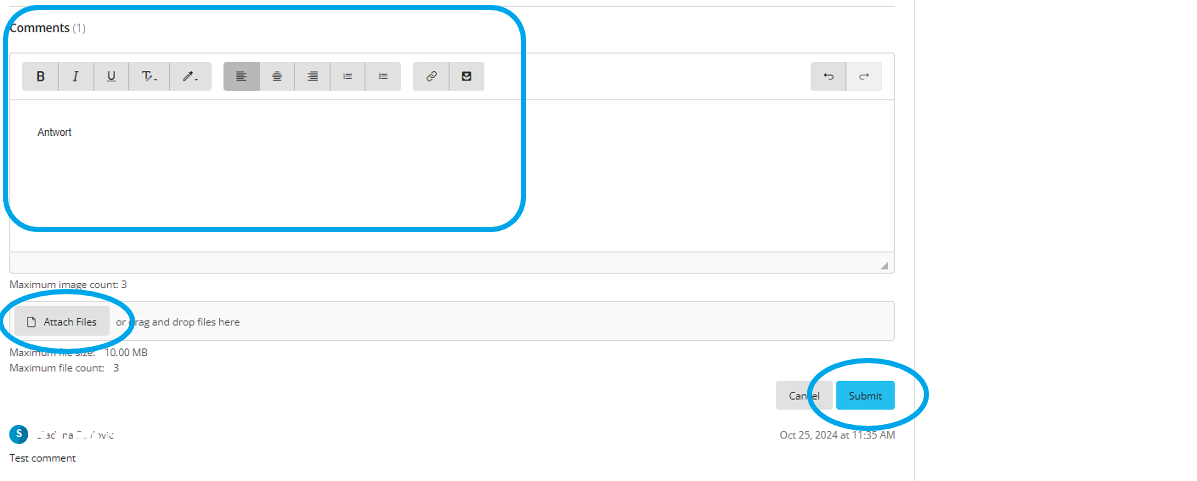
You can now write a message and upload attachments if necessary.
Click on "Submit" to send your message.
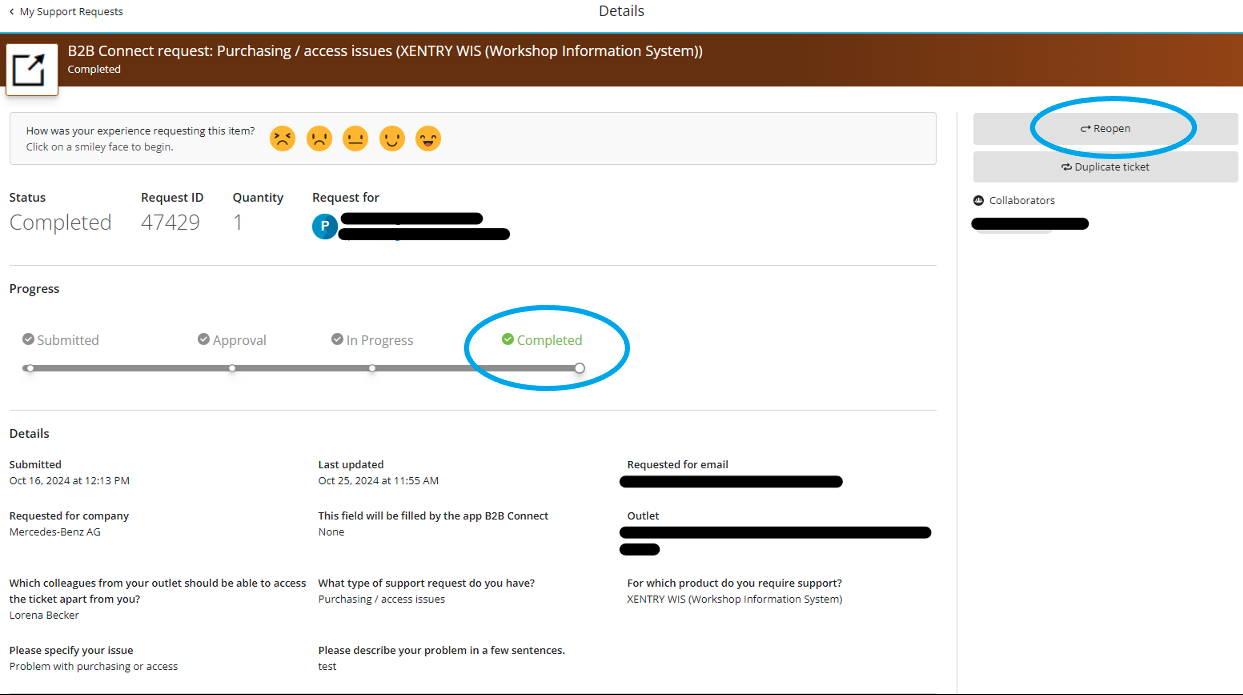
When queries are resolved or if no response is received from the requester within approx. 2 days, the request is closed.
You can reopen a closed request within 7 days. To do this, click on "Reopen".
Or you can use the "Duplicate Ticket" function if your problem has not been solved.
Attachments
Support News & Updates PDF
Open